We're here to help


Can't find what you're looking for?
Get help from any of the volunteers wearing a blue summit t-shirt, or visit the help desk on the upper level.

Event FAQ
How do I get to the venue?
If you haven’t yet arranged transportation, there are several convenient options for travel between Salt Lake City International Airport (SLC) and Park City:
- Private shuttle and car services are available through vendors such as Snow Country (contact the Stein Concierge for details).
- Stein Concierge: (435) 645-6460
- Chateaux Concierge: (435) 658-9518
- Uber and Lyft are also widely available and often the simplest option for individuals or small groups.
- Note: These transportation services are not included with your Summit registration but are available for you to book directly.
Once you’ve arrived:
- The Stein offers complimentary shuttle service for in-house guests from 7:00 AM – 11:00 PM (available on-demand via the Stein app).
- Park City also operates a free public transit system daily from 6:15 AM – 11:30 PM. For more info, call (435) 615-5350.
How do I connect to the Wi-Fi at the venue?
Network: RCGNZ25
Password: awardco!
What is the dress code for this event?
Monday, Nov 10 | Business casual (Casino Night)
Tuesday, Nov 11 | Business casual (sessions) → semi-formal (Awards Dinner)
Wednesday Nov 12 | Business casual (final day)
Will food be provided during the event?
We’ll keep you fueled throughout the Summit with delicious meals and snacks, including locally sourced treats that celebrate Utah’s mountain flavors. Vegetarian, vegan, and gluten-free options will be available.
Who will be at the Product Expo?
Connect with Awardco product leaders to learn about new features and help inform the future of the Awardco platform. Engage with sponsor booths to enhance your organization's recognition experience, and see solutions in action. You'll also get the chance to earn points at the various booths.
You can learn more about the Product Expo by navigating navigating to the "Product Expo" tab located in the "More" menu in the RCGNZ App.

How do I submit an A-team request?
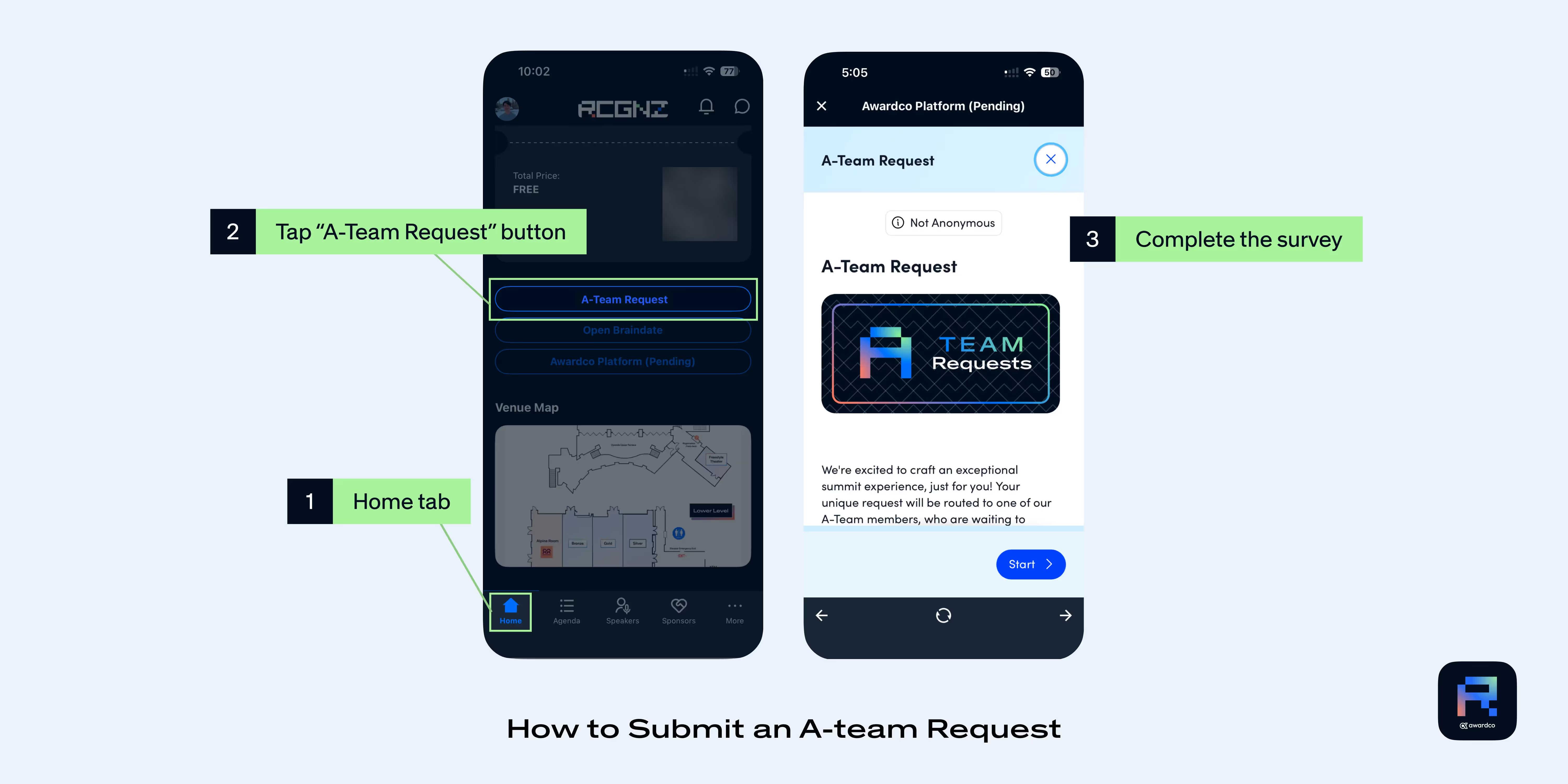
Need something during the event? The A-team is at your service. Follow these steps to submit a request to the A-Team:
- Navigate to the Home tab in the RCGNZ App.
- Scroll down to the buttons below the total price/balance section, and tap the "A-Team Request" button.
- On the "A-Team Request" screen, tap Start to access the survey and complete the survey with your request details.
(You will need to be logged to the Awardco Platform first to access this feature.)
What do I need to pack for RCGNZ Summit?
You can find the full packing list in this pdf. Tip: Park City’s mountain elevation is over 7,000 ft — stay hydrated and pace yourself when arriving to adjust comfortably.
Can I get a demo of the Awardco platform onsite?
Yes, you can visit a booth in the Product Expo to get a full demo of the full features and functionality of the Awardco Platform.
Will I receive professional development or continuing education credits for attending RCGNZ 2025?
Attendees at RCGNZ 2025 will be able to earn SHRM professional development credits. We are currently working with accreditation associations for approvals and will post more information as it becomes available.

Will there be a digital option to attend RCGNZ?
No. RCGNZ is an experiential event and will not be digitally streamed for external facing customers, prospects or attendees. Although some of the sessions will be made accessible post-show.
What is the cancellation and refund policy?
If you’re unable to attend RCGNZ 2025, you may transfer your registration to another person by October 10, 2025 at 11:59pm MST. Substitutions requested after this date may be subject to a $100 transaction fee. All RCGNZ Summit registration cancellations must be requested via rcgnzsummit@awardco.com. For a full refund, cancellations must be received by 11:59pm MST on October 10, 2025. Hotel reservation cancellations and substitutions must be arranged directly with your hotel. Hotel cancellation policies may vary.
RCGNZ App Support
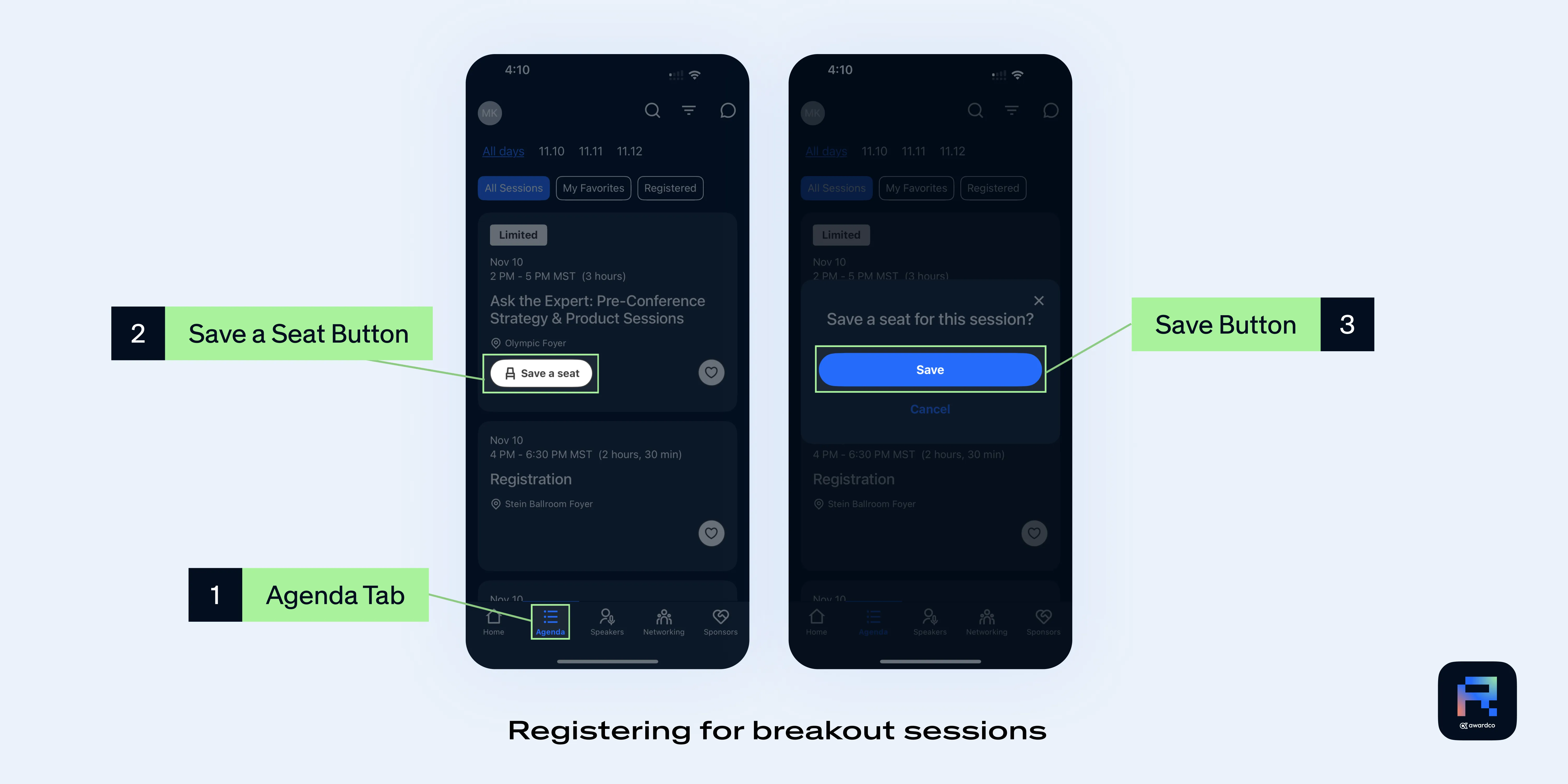
How do I register for breakout sessions?
You can register for breakout sessions by:
- Navigate to the Agenda tab
- Review the agenda and explore sessions
- Save your seat in your preferred breakout sessions
Breakout sessions will fill quickly, so we encourage you to reserve your spot early!
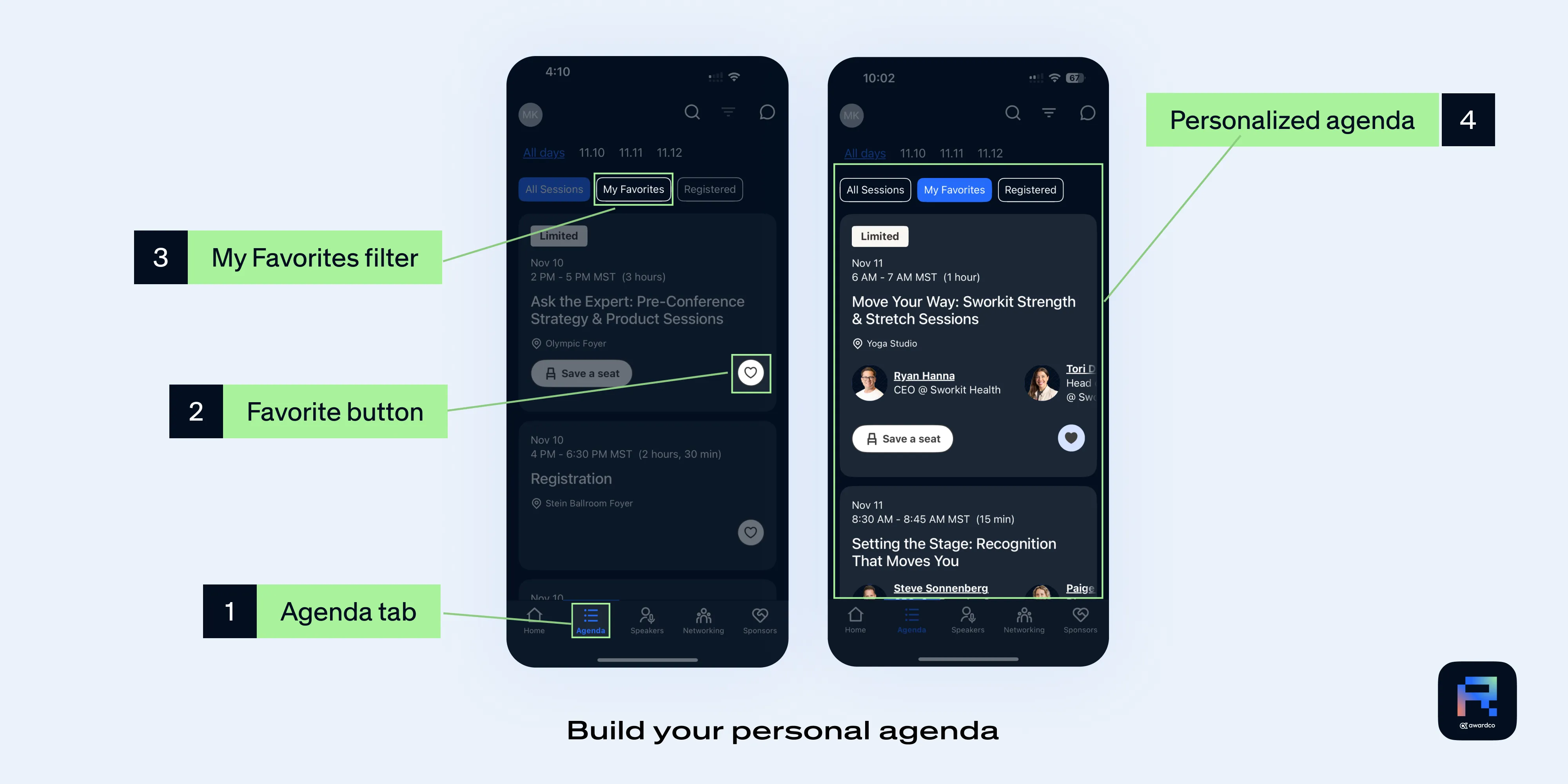
How do I build my personal agenda?
Build your personal agenda by favoriting sessions you are interested in attending.
- Navigate to the Agenda tab
- Review the agenda and explore sessions
- Favorite sessions to add them to your 'My Favorites' tab
Tip: Once you save your seat for a break out session, or join a Braindate, they will show up under the 'Registered' tab
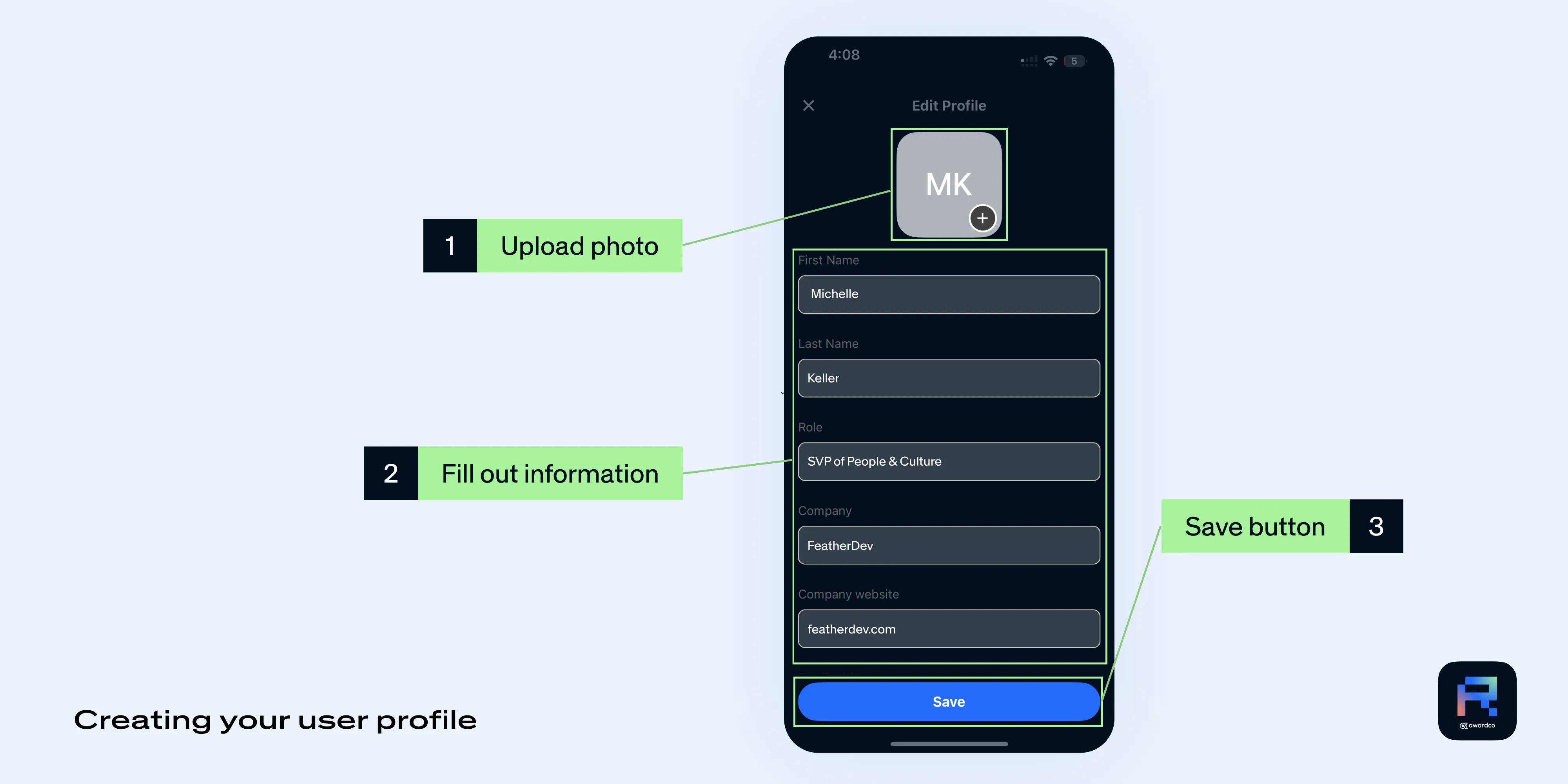
How do I update my profile in the RCGNZ App?
You can update your personal information including your profile photo directly from the RCGNZ App. We highly recommend uploading a profile photo so other attendees can get to know you better and connect with you in Braindate as well as the messaging feature on the app.
- Tap on the avatar on the top left corner of the app screen
- Tap on "My Profile"
- Tap on "Edit"
- Upload your photo, and fill out your personal information
- Hit the "Save" button
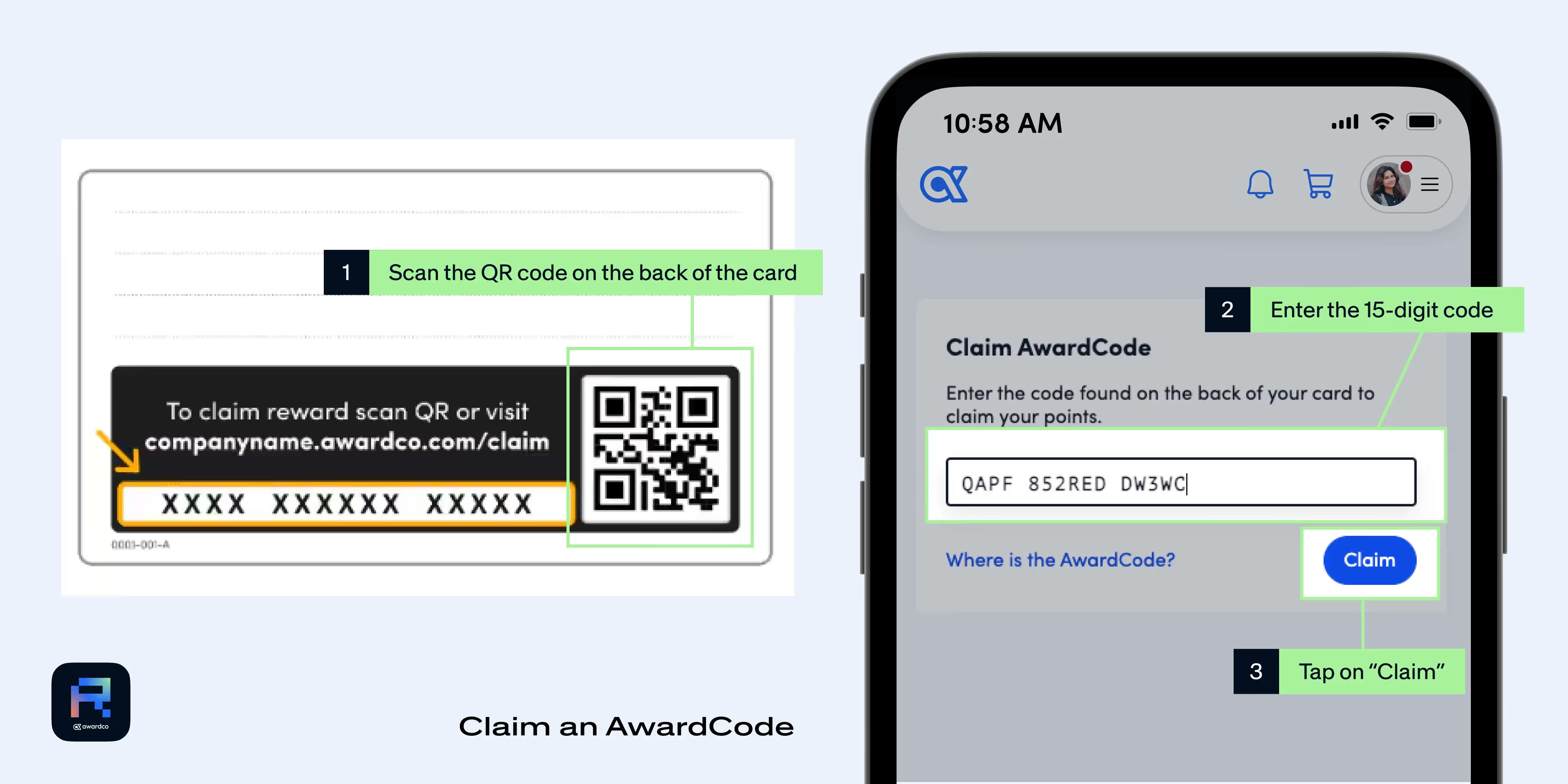
Earn Points on the Awardco Platform
Claim an AwardCode™
Upon receiving your AwardCode, begin the process of claiming your points by scanning the QR code on the back of the card or visiting rcgnz.awardco.com/claim (your organization’s recognition platform will usually be in this format). Either method will bring you to a page that prompts you to enter the claim code on the back of the card (if the QR code was scanned on mobile, the code should pre-populate).
After clicking Claim, you will be brought to the success screen which states that the points have been added to your wallet.
Login to the Awardco Platform from the RCGNZ App
Follow these steps to log into the Awardco Platform from the RCGNZ App:
- Navigate to the Home tab in the RCGNZ App.
- Scroll down and tap the "Awardco Platform" button.
- On the Awardco Platform sign-in screen, enter your email in the field provided, and then tap Continue.
- Check your email (the one you entered in step 3) for the temporary code.
- Enter the temporary code, and then tap Continue to complete the login.

Recognize a speaker
Follow these steps within the RCGNZ App to recognize a speaker:
- Open the Awardco platform dashboard from the RCGNZ App.
- Scroll down the Awardco platform dashboard to the "Opportunities to Recognize" section, and select the "Recognize Speakers" program.
- On the recognition screen, enter the name of the speaker you would like to recognize.
- Fill out the recognition form by providing the Reason for recognition.
- Tap "Submit" to send the recognition to the speaker.

Complete your profile on the Awardco platform
Follow these steps to update your profile on the Awardco platform:
- From the Awardco Platform dashboard, tap on your avatar (profile icon) in the top-right corner to open the menu.
- In the menu, tap on "My Profile".
- On the profile page, you can add a profile image by tapping the "Add Image" button.
- fill out the rest of your profile as you scroll down.
Pro tip: you can submit a screenshot of your completed program to Earn 5 points!

Recognize a fellow attendee
Follow these steps within the RCGNZ App to recognize an attendee:
- Open the Awardco platform dashboard from the RCGNZ App.
- Scroll down to the "Opportunities to Recognize" section and select the "Recognize Attendees" program.
- On the recognition screen, enter the name of the attendee you would like to recognize.
- Fill out the recognition form by providing the Reason for recognition.
- Tap "Submit" to finalize and send the recognition to the attendee.
Pro tip: You can add an Encore to any recognitions you see in the feed!

Spend your points
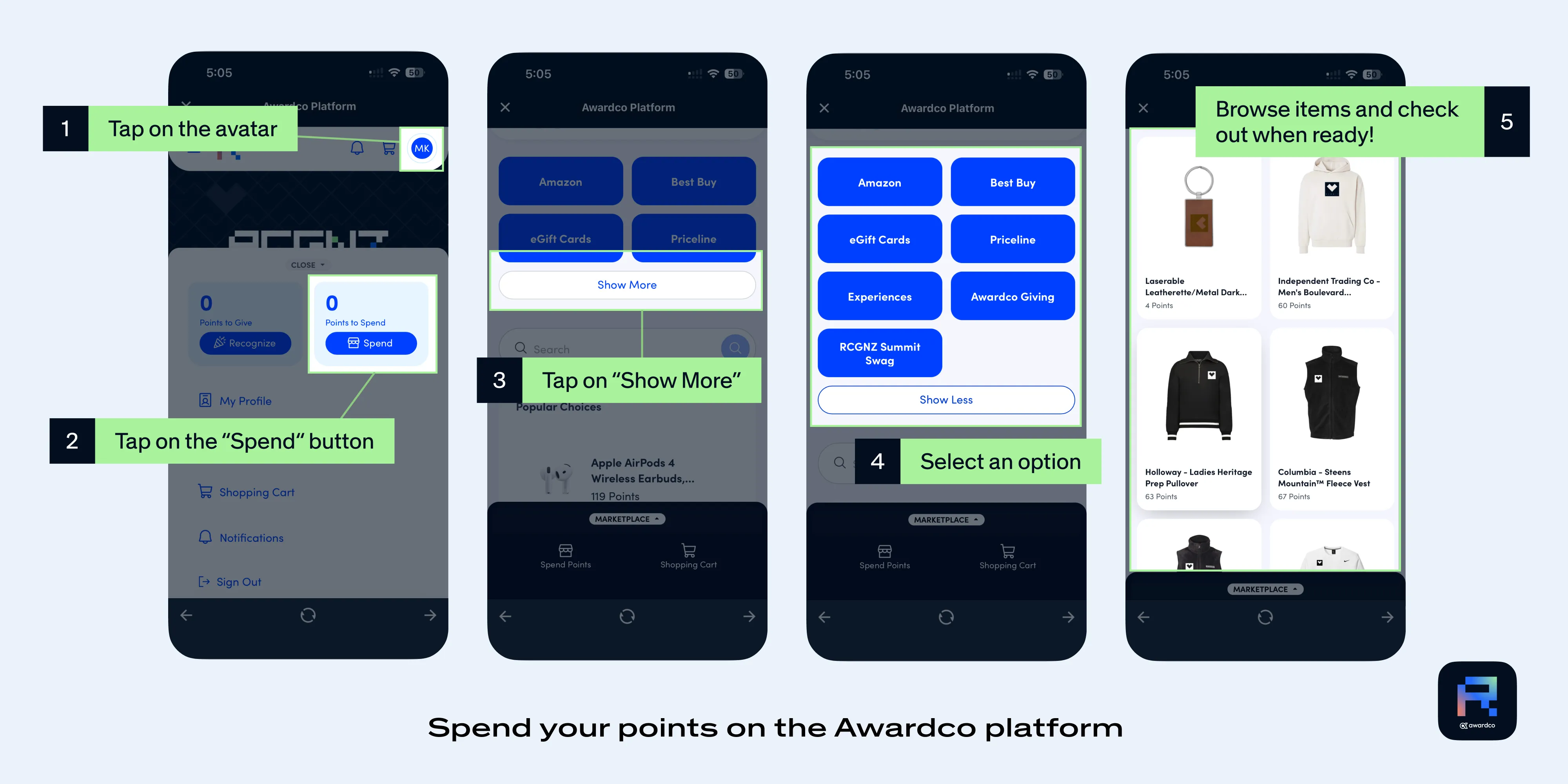
Follow these steps to access the marketplace and spend your points:
- From the Awardco Platform dashboard, tap on your avatar (profile icon) in the top-right corner to open the menu.
- In the menu, tap on the "Spend" button (it will be next to the "Points to Spend" balance).
- On the spending screen, scroll down to the "Popular Choices" section and tap on "Show More" to expand the available spending options.
- Select an option from the choices provided (e.g., Amazon, Best Buy, Experiences, RCGNZ Summit Swag, Awardco Giving, etc.).
- Browse the items available in the selected spending option and check out your desired items when ready.
Recognize someone outside the company (Awardco Staff, or Stein Eriksen Lodge Staff)
Follow these steps within the RCGNZ App to send recognition to the Stien Eriksen Lodge:
- Open the Awardco platform dashboard from the RCGNZ App.
- Scroll down to the "Opportunities to Recognize" section and select the "Recognize the Stien Eriksen Lodge" program.
- On the recognition screen, search for and find "Stein Eriksen Lodge" under "Who do you want to recognize?"
- Fill out the recognition form by providing the Reason for recognition and an optional comment.
- Tap "Submit" to send the recognition.
You can also scan the QR code on any Awardco staff member's badge to send them a recognition!

Fill out a Survey
We'll have QR codes around the event and Product Expo that link to a survey that will help us get your feedback! To access the surveys, scan the QR code, or you can scroll to 'Engagement' in the RCGNZ platform. From there, fill out the survey and any associated points will be awarded accordingly.
Braindate Help
How do I access Braindate from the RCGNZ App?
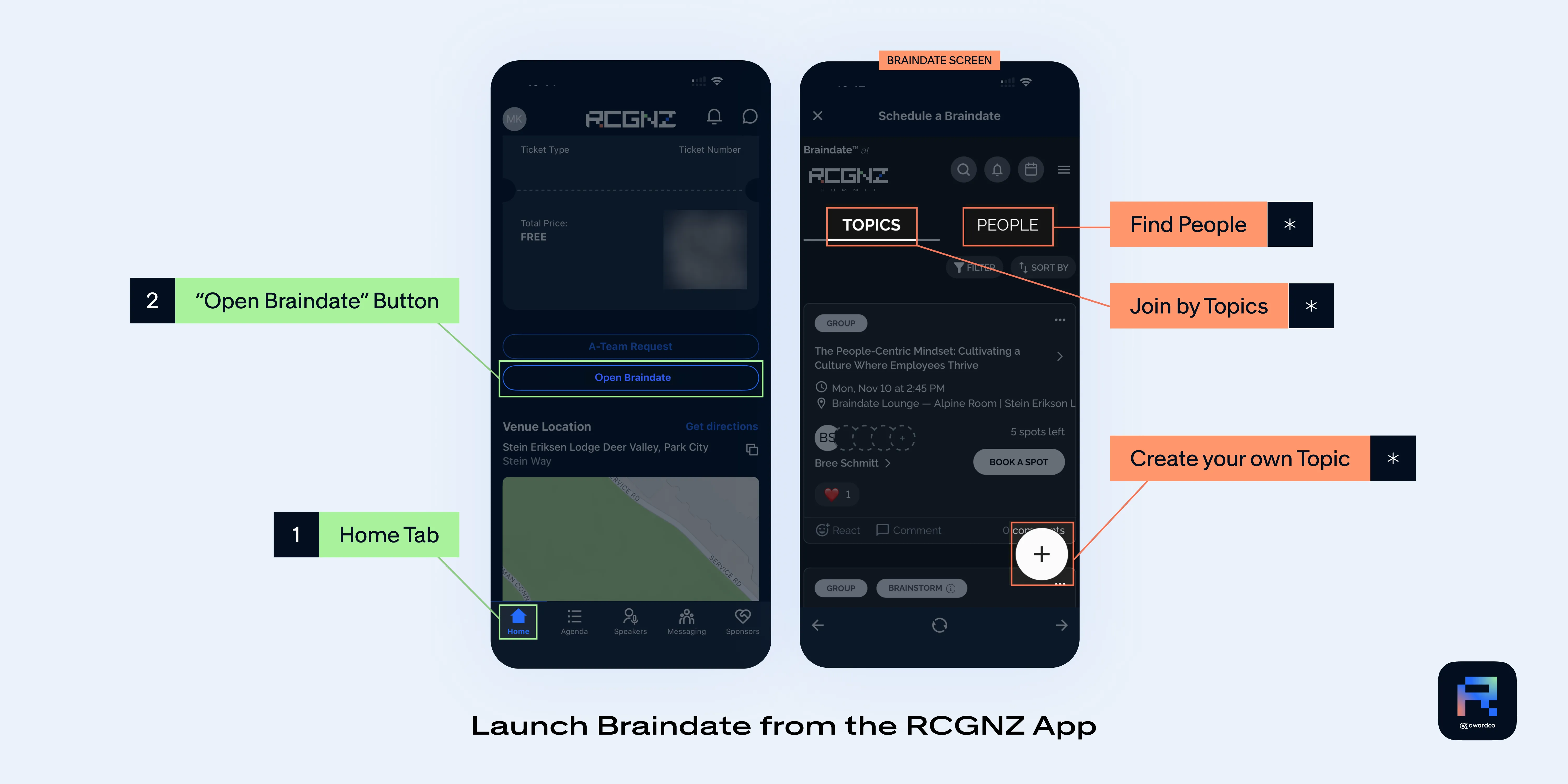
To get started, go to the home page in the RCGNZ Summit app and tap the “Open Braindate” button found above the venue location section. (See image below for reference)